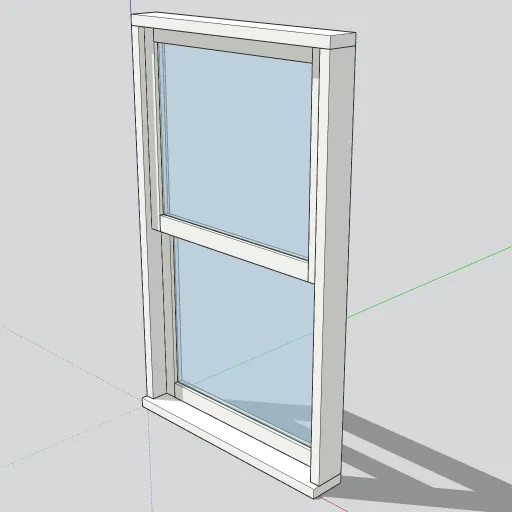
A standard 36 × 60 in double-hung window, one of the most common residential window sizes. It’s built as a SketchUp component, so you can place many copies and edit them all at once.
What’s in the model
- Frame: a head, two jambs and a sill. Each part is 1.5 in wide and 4.5 in deep. The sill projects 1 in past the exterior face.
- Two sashes: each sash is 33 in wide and 29¼ in tall and sits in its own track. The upper sash sits toward the exterior and the lower sash sits toward the interior. They overlap by 1½ in at the meeting rails, as they would in a real double-hung window.
- Glass: a ¼ in clear pane in each sash, using a semi-transparent material.
Every frame and sash part is a separate solid group. The two sashes are instances of one sash component, so editing one changes both.
How to use it
- Download the .skp file, then use File → Import to add it to your model.
- Place the window in a wall opening 36 in wide and 60 in tall. The component origin is the exterior bottom-left corner of the frame, and the sill extends 1 in outward from there.
- To change the color, open the component and use the Paint Bucket on the frame parts. Because the sashes share one definition, painting one sash also paints the other.
Modeled by SketchUp Warehouse with AI assistance. Free to use in personal and commercial projects. Found a problem with the model? Tell us.